
Important:
- You can ONLY renew licences that have “Pending” or “Late” status.
- You should remove all deceased or rehomed dogs before renewing
- You should add new dogs before renewing.
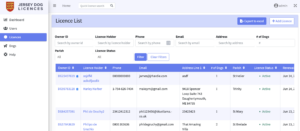
- Navigate to ‘Licences’ in the left-hand sidebar
- Search for the licence owner by using their name, licence ID, phone number, email address or the first line of their address. If you are having trouble finding a specific licence, please make sure that other filters are cleared and try your search again. (See the article on Filters if you need help with this).
- Click on the owner ID or Licence Holder’s name to navigate to their licence:
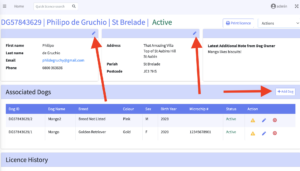
- Use the ‘pencil’ icons to update the licence holder’s personal and contact details
- To remove dogs from the licence, see the article on Removing a Dog.
- To add new dog/s from the licence, see the article on Adding a Dog.
- To edit a dog’s details, see the article on Editing a Dog Record.
- When you have finished making changes, select “Renew Licence” from the actions menu:

- Select the method of payment used by the dog owner
- Click on the ‘Renew licence’ button.
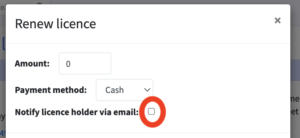
- If you would like to notify the dog owner of their new licence then select the checkbox ‘Notify Licence Holder Via Email’ before selecting ‘RenewLicence’. This will send a new licence confirmation along with a PDF containing the details of their licence:
 Important: New dogs can only be added to an “Active” licence. Once you have renewed the licence and the licence status has changed to “Active” you can proceed with adding any additional dogs to the licence. You can add new dogs to the licence by selecting the ‘+ Add dog’ button on the right-hand side of the screen