
You may want to add a note to a licence, for example when you have called the licence holder.
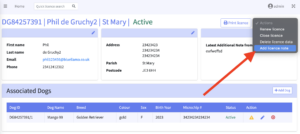
- From the licence view page, navigate to the Actions drop-down in the top right-hand corner.
- Select ‘Add licence note’
- Type whatever you would like to add to the licence
- Select the ‘add note’ button to confirm
This note will be viewable in the licence history. The latest note added by you (or the dog owner) will also be viewable in the licence list as a ‘licence note’ next to the owner ID number. Simply hover your mouse over the clipboard icon to view the latest licence note.

Please note that the ‘Latest additional note from dog owner’ field on the licence view page will NOT update. Only notes left by the owner are highlighted here.