
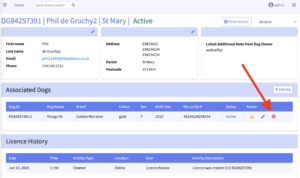
- From the licence view page, you will be able to see all of the licenced dogs for that owner.
- To remove a dog that has died then select the red X icon located in the far right “Action” column. When prompted for the removal reason, select “Dog is deceased” from the dropdown. Then select the “Remove Dog” button.
- To remove a dog that has been rehomed then select the red X icon located in the far right “Action” column. When prompted for the removal reason, select “Dog has been rehomed” from the dropdown. Then select the “Remove Dog” button.
Once you remove a dog, it will remain viewable on the licence, however it will be greyed out and only be viewable by parish staff. It will not appear when the dog holder views their licence online.