
As a Super Administrator (Superadmin) you have the ability to create new users in POODL. There are 3 types of users that you can create:
- Superadmins. Superadmins have no limit on their permissions. They can create and manage other admin accounts.
- Admins. Admins have full access to all records and licence data. However, they are unable to create, manage or view other POODL admins
- Read Only. This type of user has very similar access as a regular admin. They are still able to view all licence records and export data. However, they are unable to make edits and changes to records.
To create a new user:
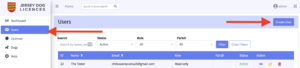
- Navigate to ‘Users’ in the left-hand pane
- Select the ‘Create User’ button in the top right corner:
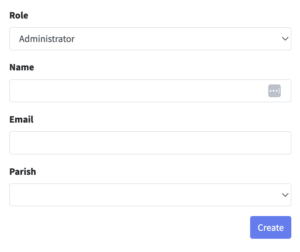
- From the “Role” drop-down menu, you can select what type of user you want to create (aka Superadmin, Admin or Read-Only)
- Fill in all fields and select the ‘Create’ button:
- The user will be sent a welcome email along with a link that they can use to login and set their password.
Please note that “Read Only” users and “Superadmins” cannot be associated with a Parish aka you cannot select a Parish from the dropdown when you create either of these types of user.