
When you log in to your account, by default, you will only see the licence data and the dog data for your Parish. This applies to data in the dashboard, the licence list, and the dog list.
However, as an admin, you have access to data from any and all Parishes. To view different data:
- Go to the licence list or dog list (from the left-hand sidebar).
- In the “Parish” dropdown click on the X next to any current Parish filters that have been applied and then click “Filter”. You can also click on the “Clear Filters” button. Either of these options will allow you to see data from all Parishes:
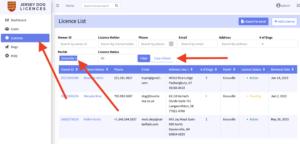
- To view Parish data from just one particular Parish (or multiple Parishes) then simply use the Parish dropdown to select the Parish(es) that you want to view.
In the dashboard view, you can use the Parish dropdown in the top right corner to see data for different Parishes.
