
Financial reporting allows Admin and Superadmin users to see a breakdown of all transactions made in POODL.
To use this feature, simply:
- Navigate to the left-hand pane and select “Reporting”.
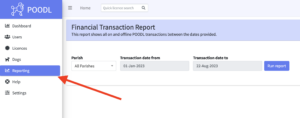
- Select the Parish financial data that you want to view (NOTE: Only Superadmins can run a report for all Parishes. Admins are limited to only viewing financial data in their own Parish)
- Select the date range and then ‘Run Report’
A .xls file will immediately download to your computer.
Please also note that Read-Only admins cannot access this feature.